Custom Self-Hosted AI Work Assistant with No Data Leakage
OurServer AI is an AI work assistant that finds evidence in your uploaded Excel, PDF, image and note files — ask in a sentence and it answers with evidence from those files. It is our own product — planning, design, development and operation included — completed in September 2026 with a Next.js full stack, MongoDB and a self-hosted language model.
Verifying the evidence behind answers
Before
Contract terms, quality standards and inspection routines are scattered across Excel, PDF, image and note files, so finding an answer takes time.
After
Each answer carries the file name and location (sheet, section number) for immediate verification.
The model behind the answers
The language model runs on servers we operate ourselves. This rule is enforced by an automated check that runs on every build, and any code that falls back to an external model is blocked at the build stage.
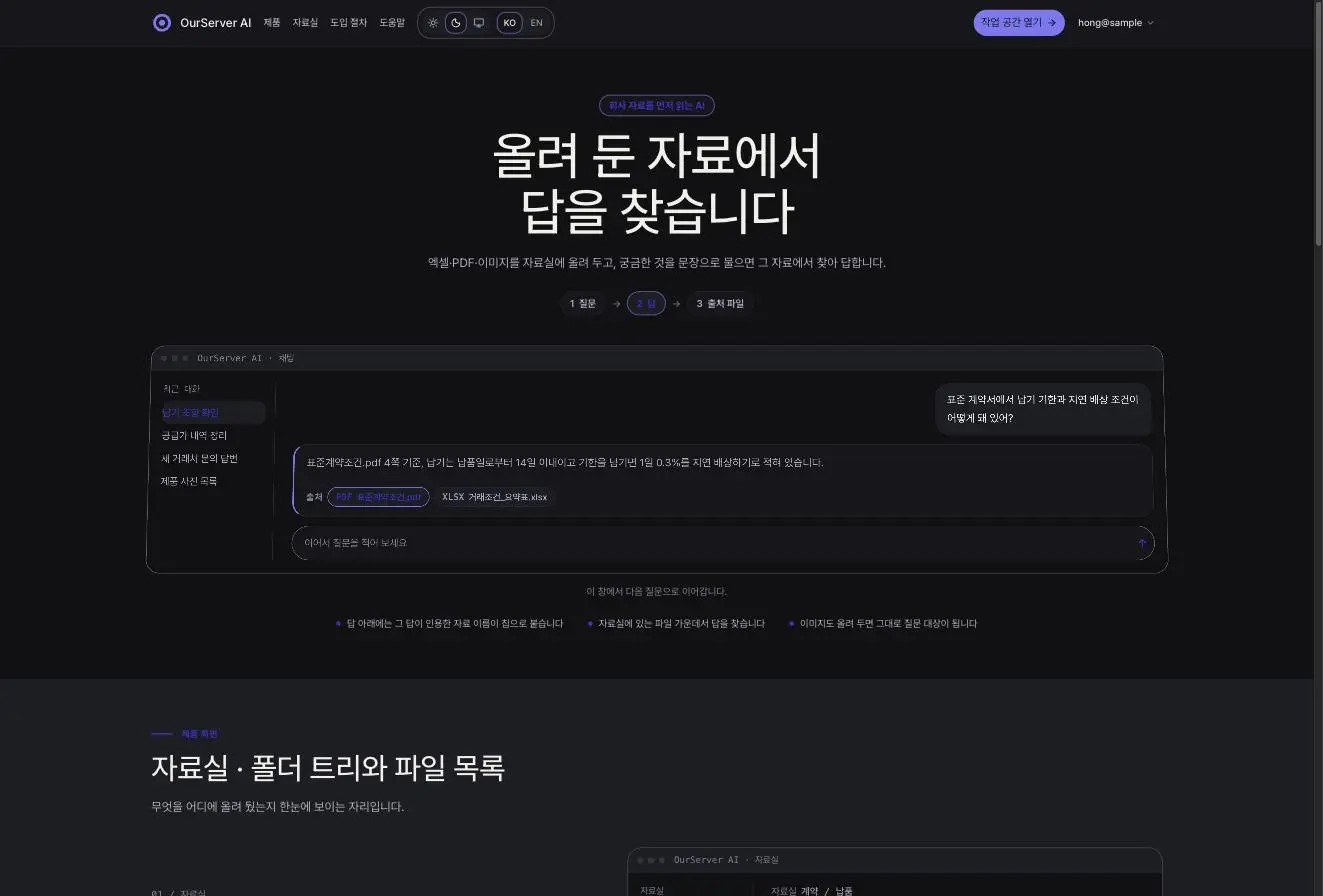 Landing page: “We find answers in the files you uploaded” and the three-step Question → Answer → Source flow
Sourced answers
It reads sheets and cells in Excel, section numbers in PDFs, and even images and notes. The file name and location are written into the answer body, and the side “References” panel shows the cited files and folders along with a “N references” badge. When needed, it adds up-to-date information via web search and attaches the web source. It answers in the language you asked in, and can also search past conversations.
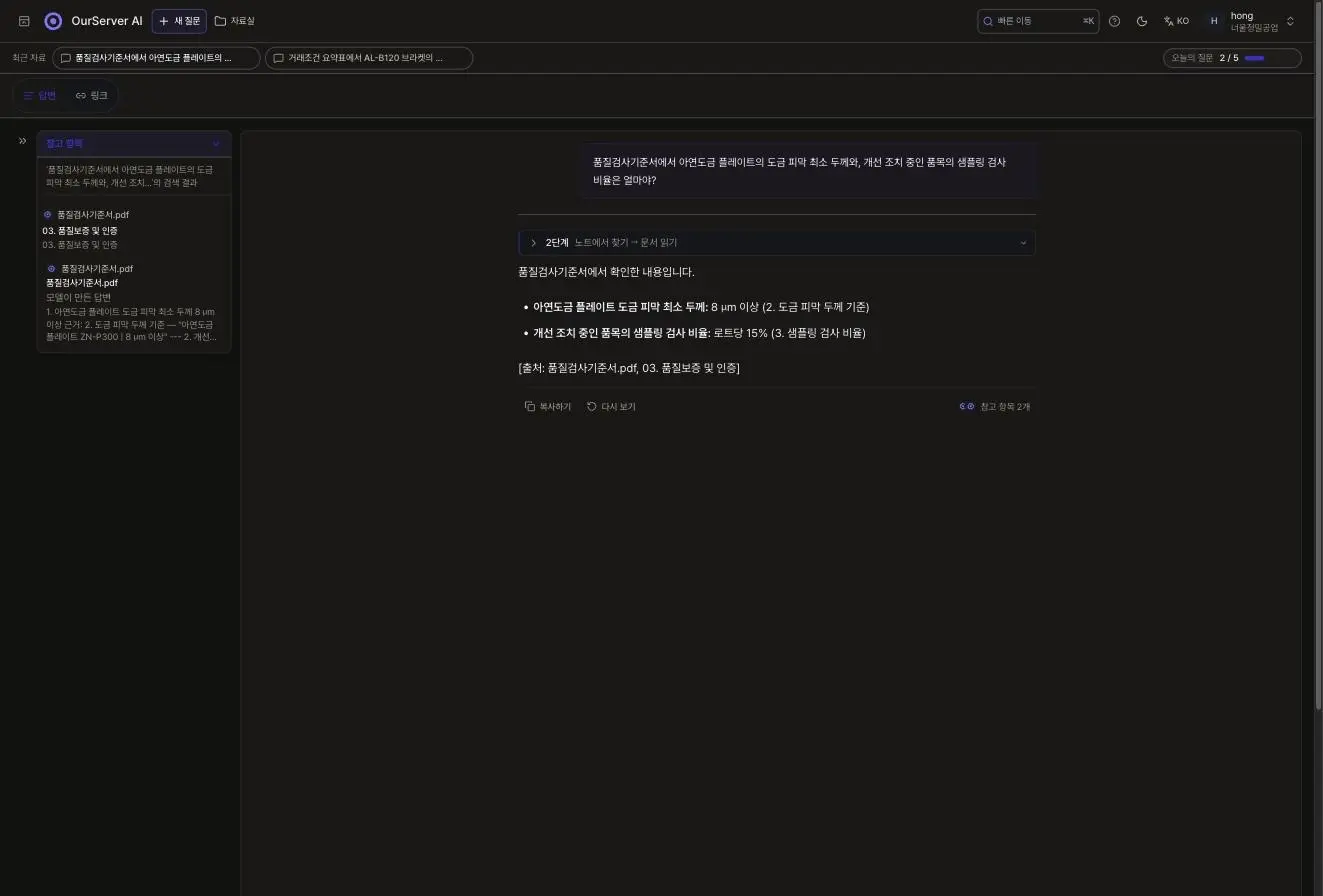 An answer finding 8 µm or more (Section 2) and 15% (Section 3) from 품질검사기준서.pdf
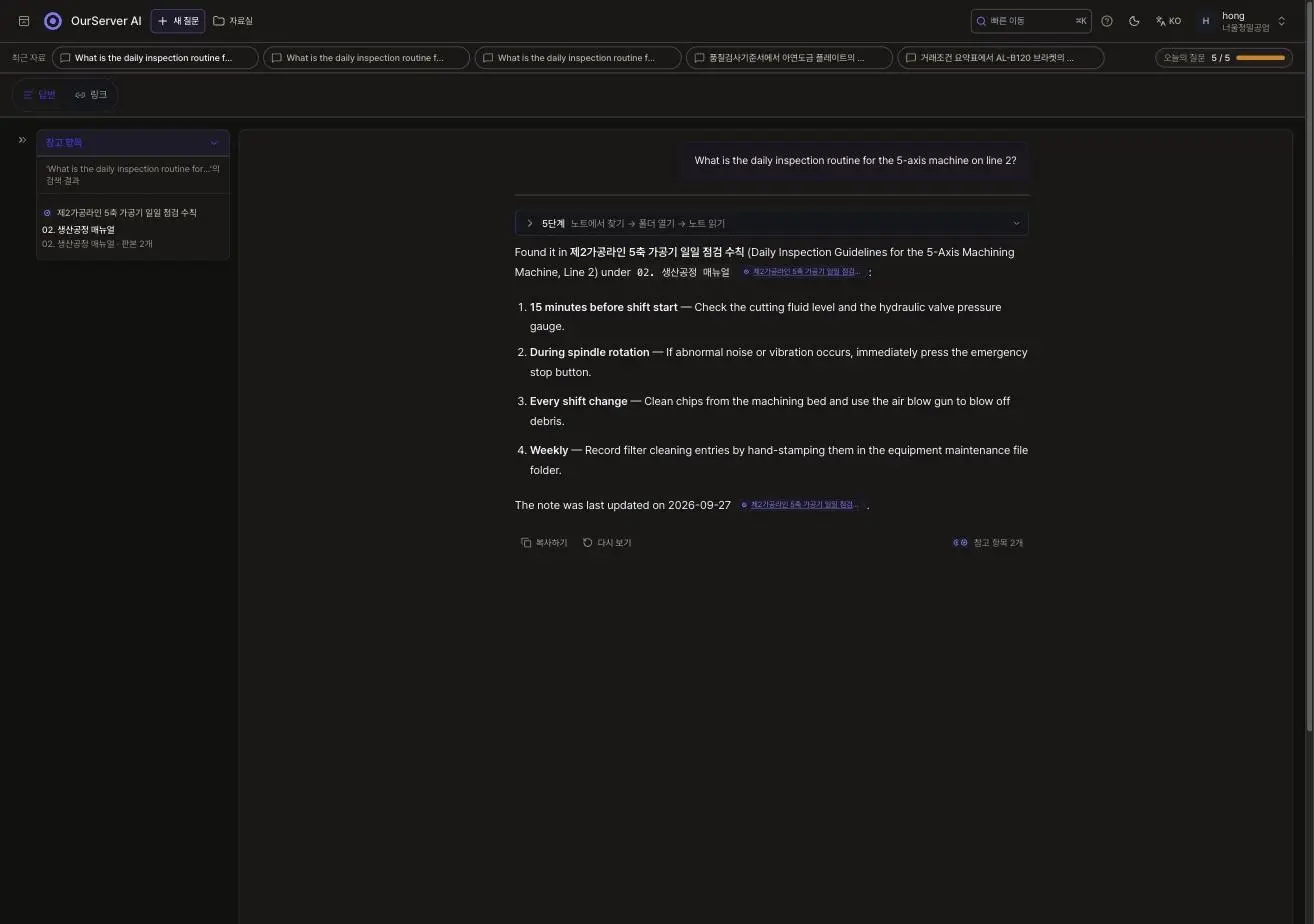 An English question (5-axis machine daily inspection) answered in English with four steps, sourced from the inspection notes
Document library
You can organize files with a folder tree and use list and grid views, Excel/PDF/image previews, a trash bin, and recent items. Anything the assistant remembers is saved as a note, which you can open, edit or delete.
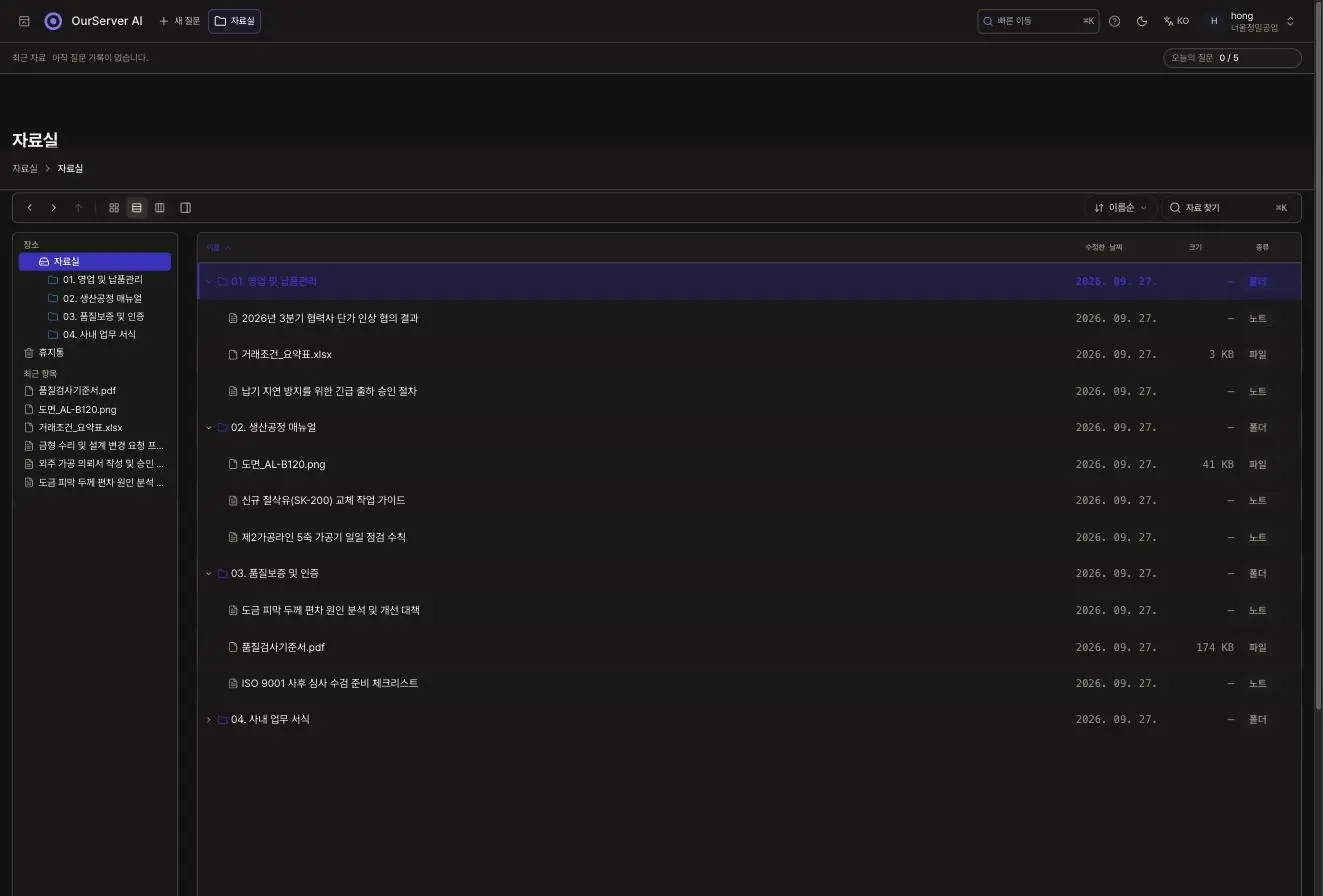 Library list view: four folders with notes, Excel, image and PDF files beneath, plus the left tree, trash bin and recent items
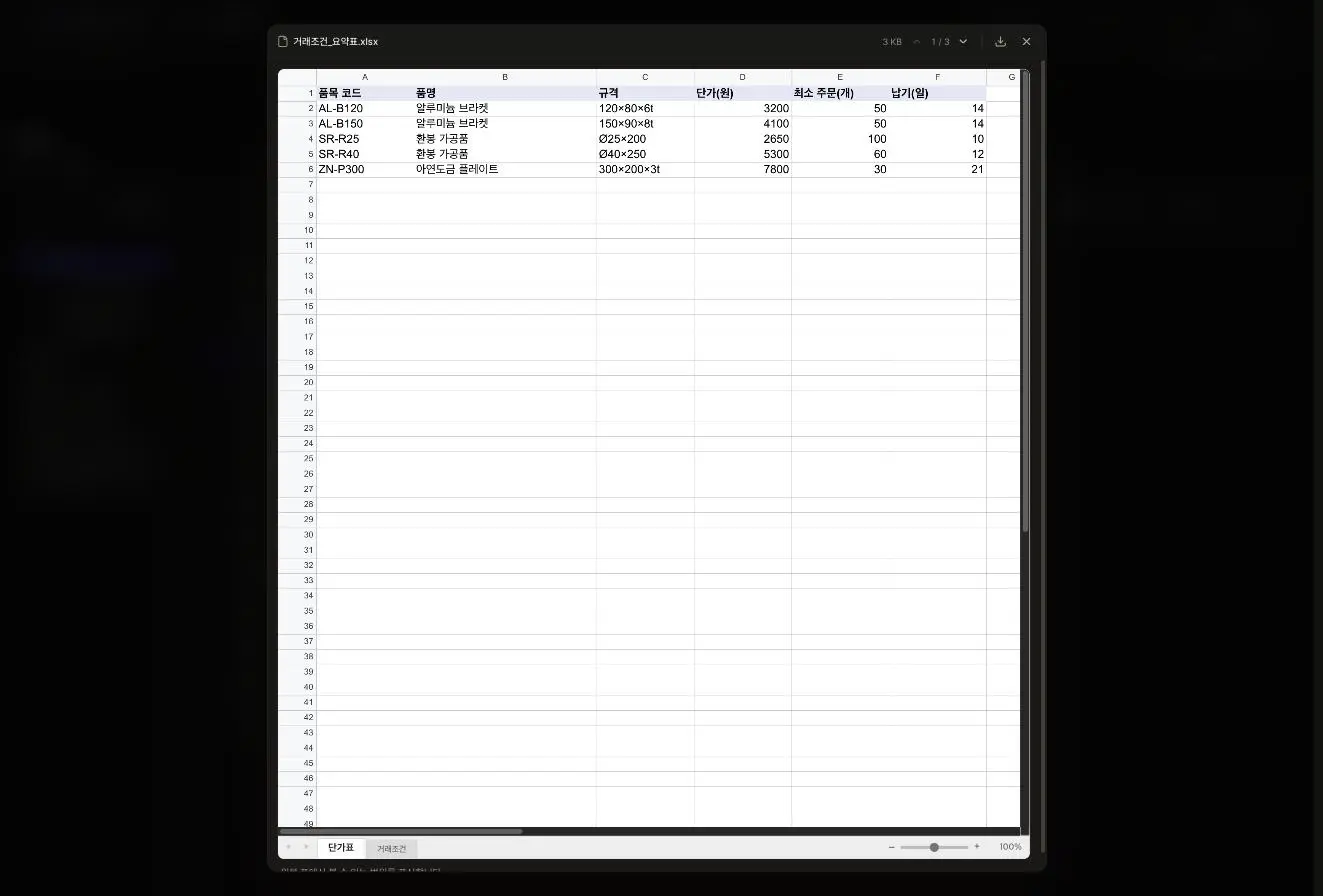 Excel preview: the Price list sheet of 거래조건_요약표.xlsx with sheet tabs below
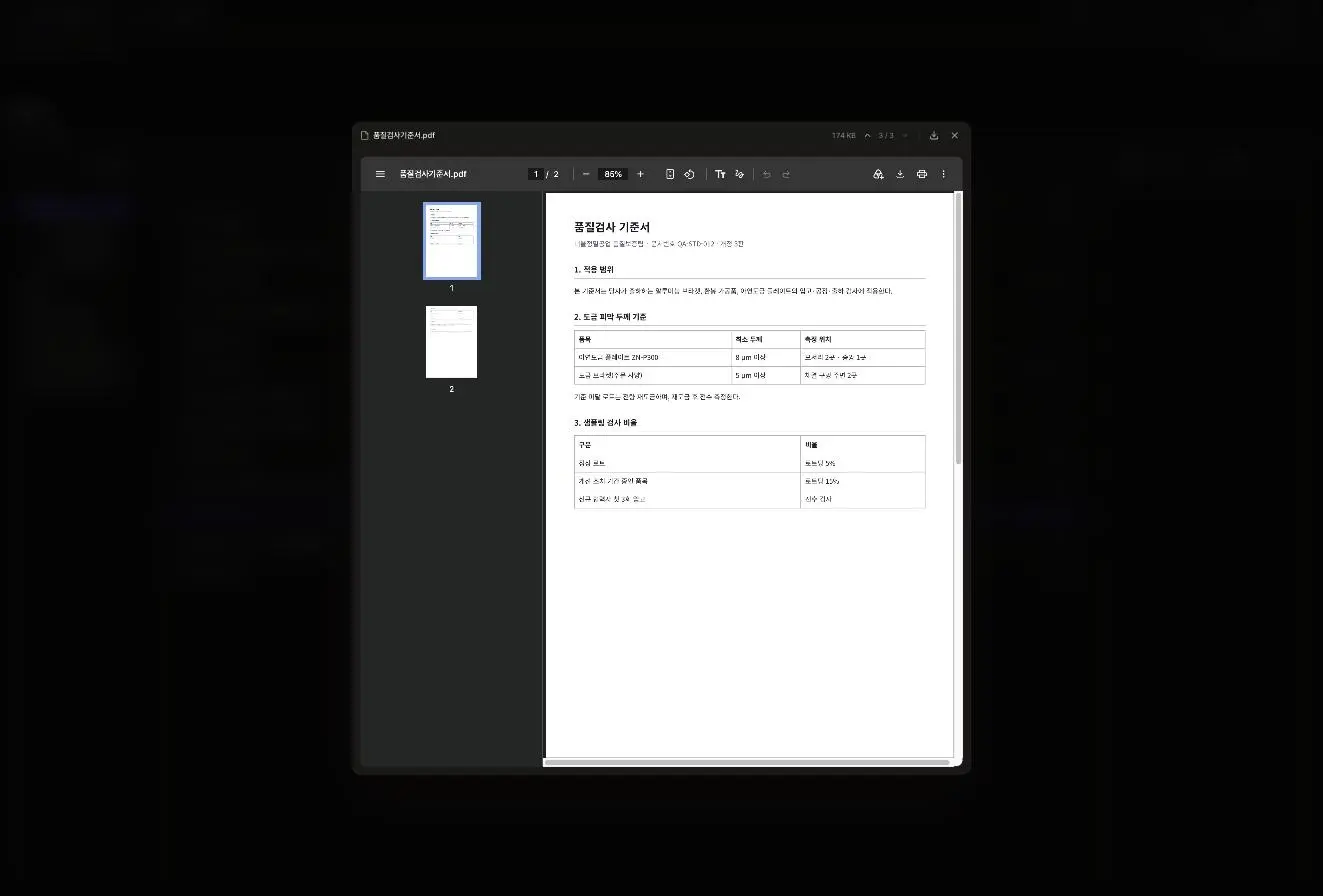 PDF preview: page 2 of 품질검사기준서.pdf
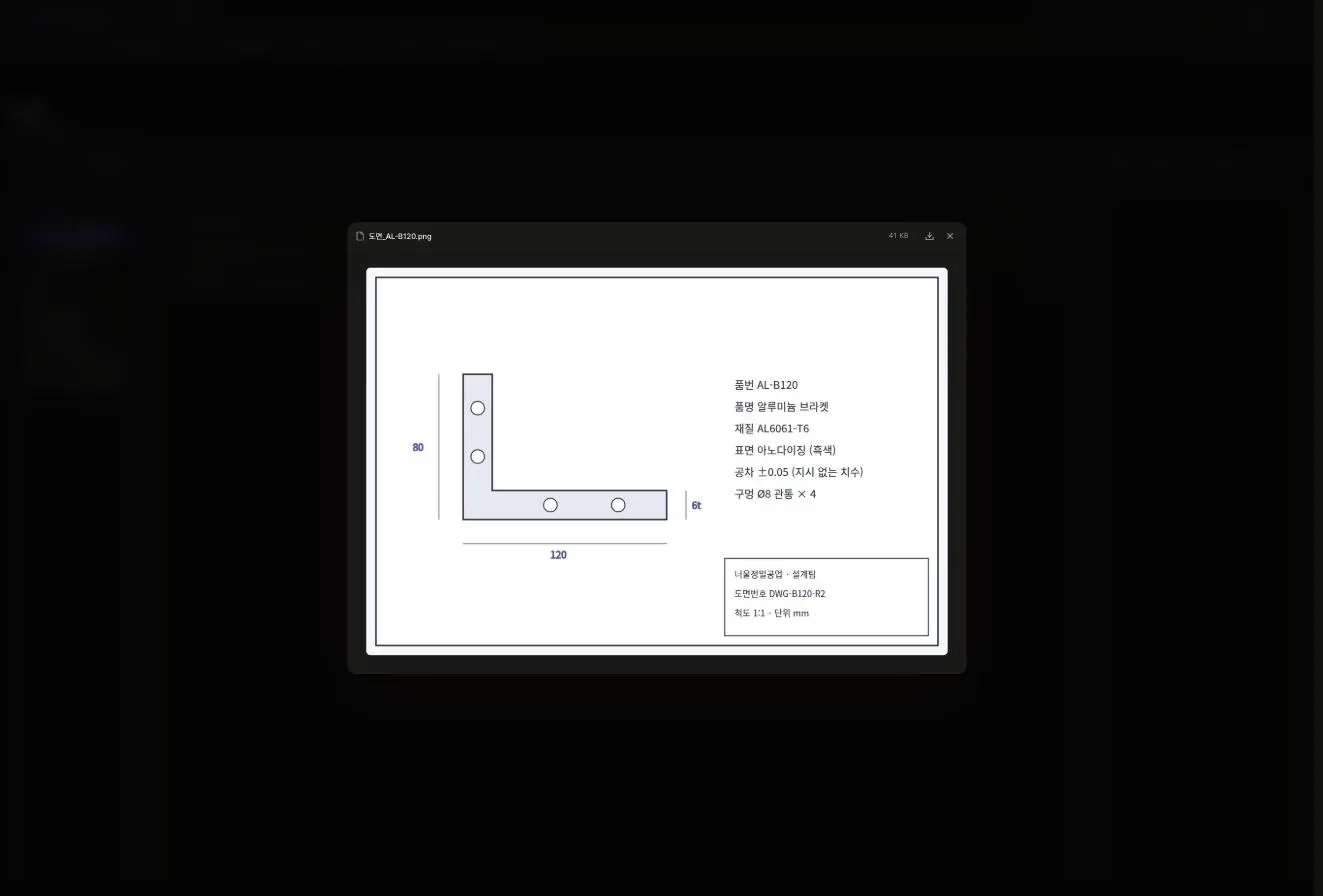 Library image preview opened to 도면_AL-B120.png
Teams and operations
Files and conversations are separated by workspace (team), and email invitations assign member and admin roles. In the operations console “Operations log”, the “Overview” tab shows the last 14 days’ run trend, errors, tokens and a cost reference value, while the “Usage log” records the model, stage, input/output tokens and time spent for each run. A daily question limit is shown on screen as “Today’s questions N / 5”, and it also provides Korean/English and light/dark theme switching plus post-signup email-verification login.
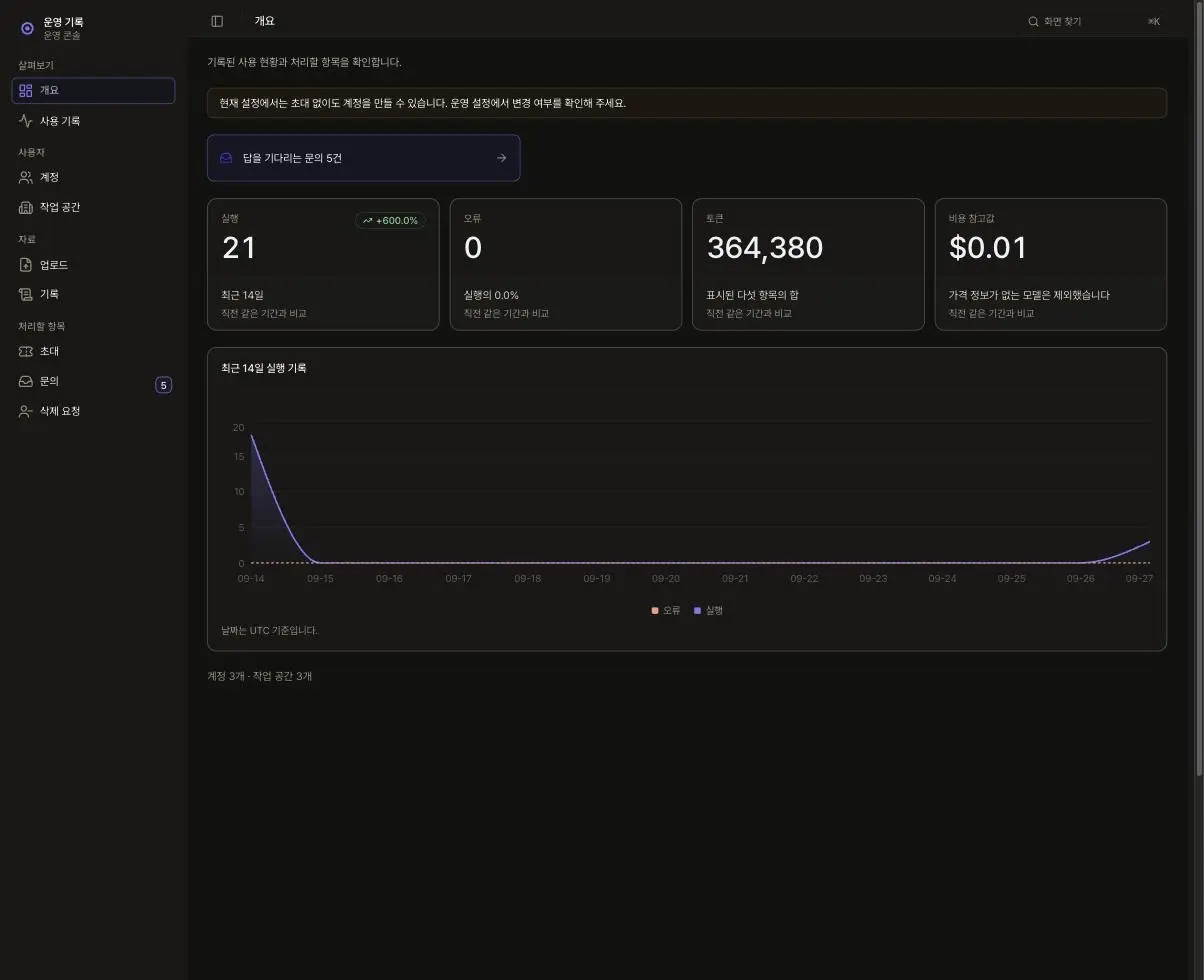 “Operations log” overview: a last-14-days run trend graph with errors, tokens and a cost reference value
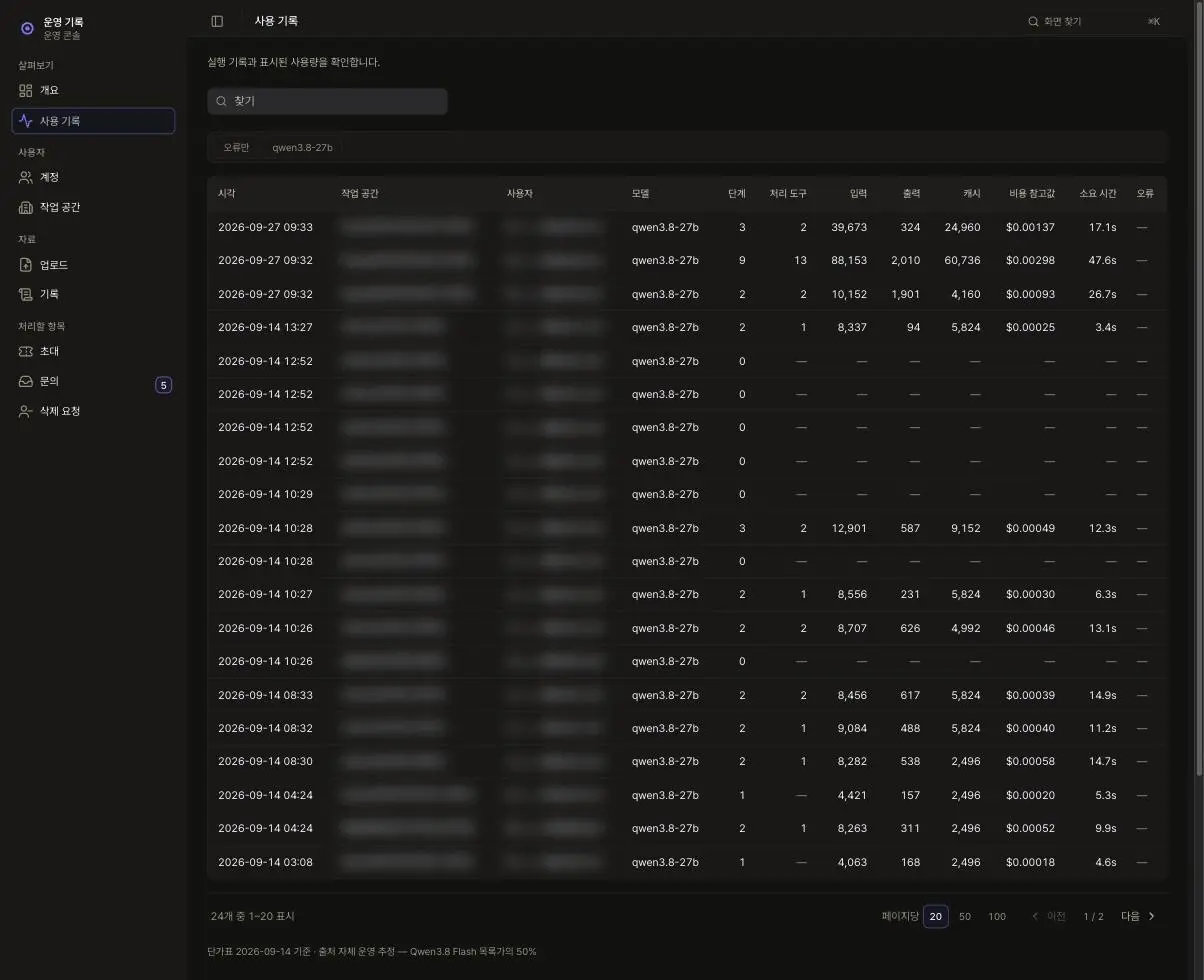 “Usage log”: per-run model, stage, input/output/cache tokens and time spent, with identity columns masked
Deployed differently per client
The instructions that define the assistant’s role live in a single deployment-settings location. Changing only this setting deploys a domain-specific assistant, and using different build settings lets us run two separate brands with distinct names, link-preview images and sender emails.
Example answers
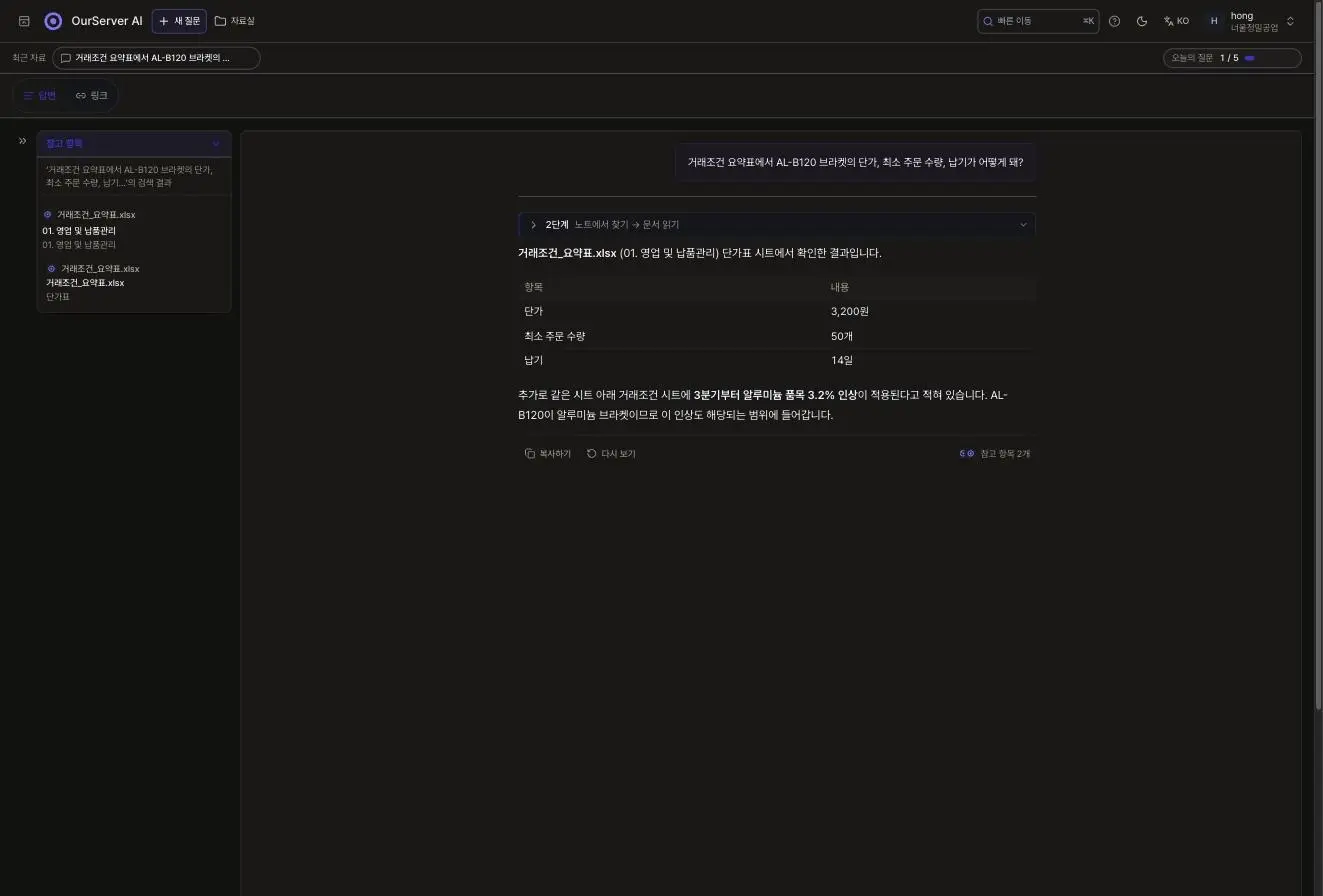
To the question “In the trade terms summary table, what are the unit price, minimum order quantity and lead time for the AL-B120 bracket?”, it answers in a table (unit price 3,200 KRW, minimum order 50, lead time 14 days) and also flags the 3.2% Q3 price increase on the Trade terms sheet. To “From 품질검사기준서.pdf, the minimum coating thickness for galvanized plates and the sampling ratio?”, it finds 8 µm or more (Section 2) and 15% (Section 3), citing the file name and section number. All companies, items and figures on screen are demo data.
Project background
- Problem
- Contract terms, quality standards and inspection routines are scattered across Excel, PDF, image and note files, so finding an answer takes time.
- Since most approaches upload files to external AI services to get answers, we needed a way to handle the files on our own servers.
- Project goals
- We built a document library that gathers everything in one place, so that asking in plain sentences returns both the answer and its source from those files.
- It answers in the language you asked in and lets you search past conversations.
- Key focus
- Users can verify an answer at a glance by checking the file name and location (sheet, section number).
- Files and conversations are separated by workspace, and run details can be reviewed in the operations screen “Operations log”.
Results
Answers from a self-hosted language model The model that generates answers runs on servers we operate ourselves, and this rule is upheld by an automated check that runs on every build. We designed the verification process down to the operations screen “Operations log”.
Answers found in the library and cited to source It reads Excel, PDF, images and notes and attaches the file name and sheet/section number to each answer. The “References” panel, previews, trash bin and team invitations were all designed as a single on-screen flow.
Key features
Data-leak-proof self-hosted server Built the AI model in an on-premises/dedicated server environment so that internal data never leaves the company, ensuring security.
In-house document context search with source citation Analyzes Excel sheets/cells, PDF section numbers, images and notes to return answers that include the file name and precise location.
References panel and document preview Instantly visualizes the source documents and folders in a side panel, and offers Excel/PDF previews for easy verification.
Team-level security isolation and permission management Strictly separates files and conversations by workspace, with email-invitation-based role assignment.
Transparent operations log console View the operating status at a glance: 14-day usage trends, errors, token/cost reference values and time spent.
Stages
- Planning — Defined the rules for attaching sources to answers and the document library structure, and set the screen names and flow.
- Design — Composed the chat, document library and the “Operations log” console, and prepared Korean/English and light/dark themes.
- Development — Built on a Next.js full stack and MongoDB with a self-hosted language model, and implemented role and brand separation through deployment settings.
- Verification & operations — Applied post-signup email-verification login, and established checks with a per-workspace daily question limit and the operations log screen.
Other products we build and operate ourselves are listed under our own products.