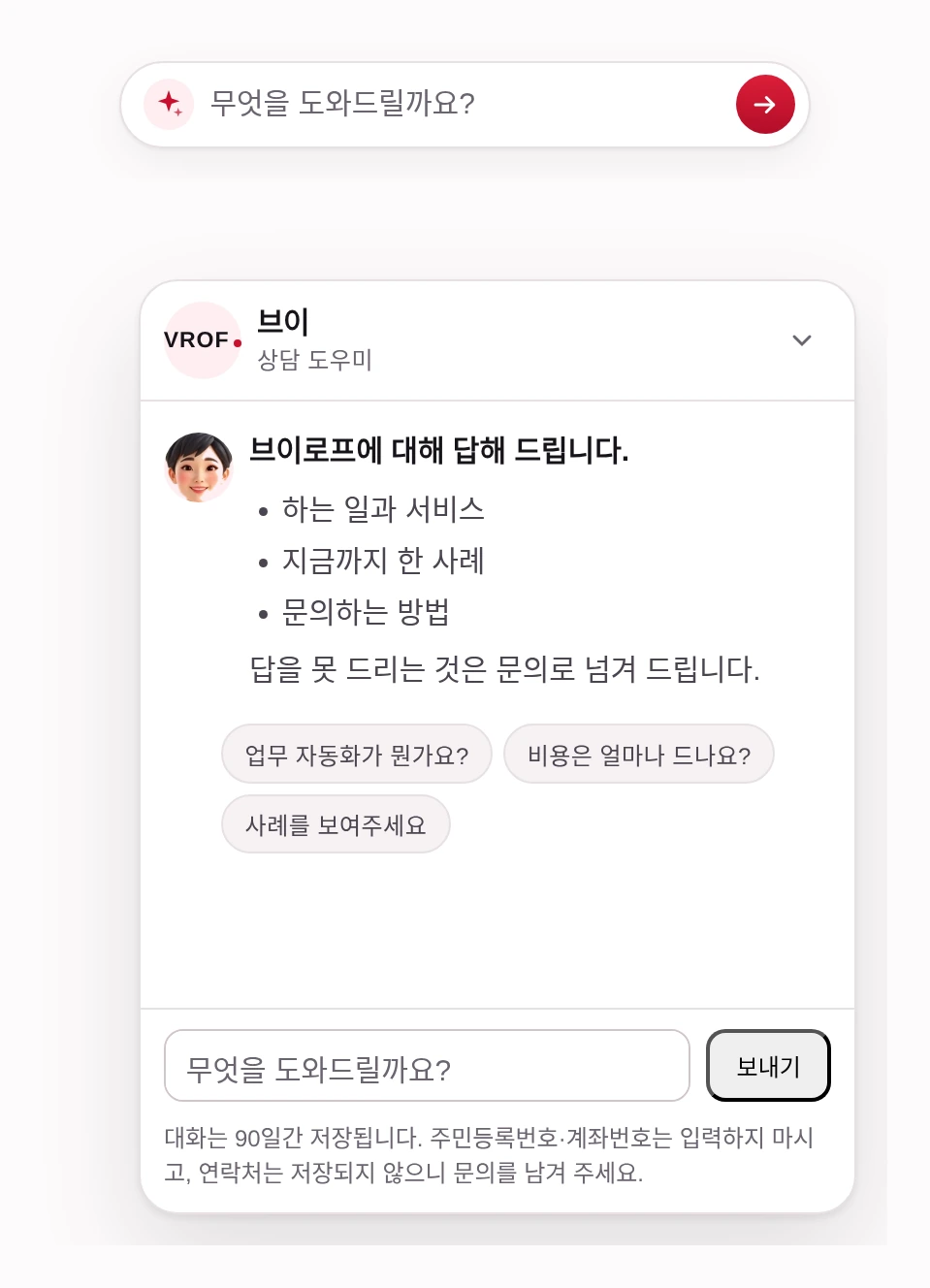
It is operating right now at the bottom right of this page
Click it and try asking directly. We retrain the exact system you are using right now on that site’s content and integrate it.
5 languages · 5 expressions · Automatic deletion of 6 types of personal information
Every answer comes from what is written on the site
It learns from what is written on the site to answer only within that scope. When asked something outside that scope, without making things up, it passes it to an inquiry.
-
Personal information is deleted before saving
It distinguishes and deletes six items: resident registration numbers, account numbers, card numbers, passwords, phone numbers, and email addresses. Once before logging, and once before sending to the AI model — only the values after deletion go outside.
-
Conversations are deleted after 90 days
Records must be kept to see what questions are being asked, but keeping them longer than necessary turns the record itself into a risk. A cleanup task running once a day deletes conversations older than 90 days.
-
Hands over to a person
When a visitor says they want to speak with a person, a notification is sent to the representative’s email. Information on which page they were on and what they were asking before being handed over comes along with it.
-
Handles five languages in a single setup
Korean, English, Japanese, Chinese, and French. The guide’s name also differs by language — 브이 · Vee · ブイ · 小V · Vee. Instead of building separately for each language, a single setup handles all five.
| What the visitor typed | What remains | What is hidden and what is kept |
|---|---|---|
| My number is 010-1234-5678 | My number is 010-****-**** | Hidden |
| My email is hong@example.com | My email is ****@**** | Hidden |
| Card 4111-1111-1111-1111 | Card ****-****-****-**** | Hidden |
| Is the business number 433-88-02526 correct? | Is the business number 433-88-02526 correct? | Kept |
| What is patent 10-2024-0022442? | What is patent 10-2024-0022442? | Kept |
| Our budget is about 1,200,000 KRW | Our budget is about 1,200,000 KRW | Kept |
These are the actual results of feeding the left column in. The bottom three are kept on purpose — erasing business numbers, patent numbers and amounts breaks the answer entirely.
Visitor Write me quicksort in Python
Vee That is outside what I can help with. Please ask me anything about this company services or cases.
This is the answer the chatbot actually produced, copied as is. A decline is recorded as “out of scope” and collects in the Defended Questions table at the bottom of the admin screen.
[Chat] Handover request · vrof

Site   : vrof
Page   : /service/chatbot
Masked : 1

── How to reply ──
This mail contains no contact details for the visitor. Phone numbers and emails are erased before storage, and the visitor was told that contact details are not stored.

── Conversation so far ──
Visitor: I would like to discuss a quote with a person
Vee: Please leave an inquiry and someone will follow up
This is the format of the mail that actually goes out. It carries which page they were on and what they were asking, so the person in charge does not have to start over.
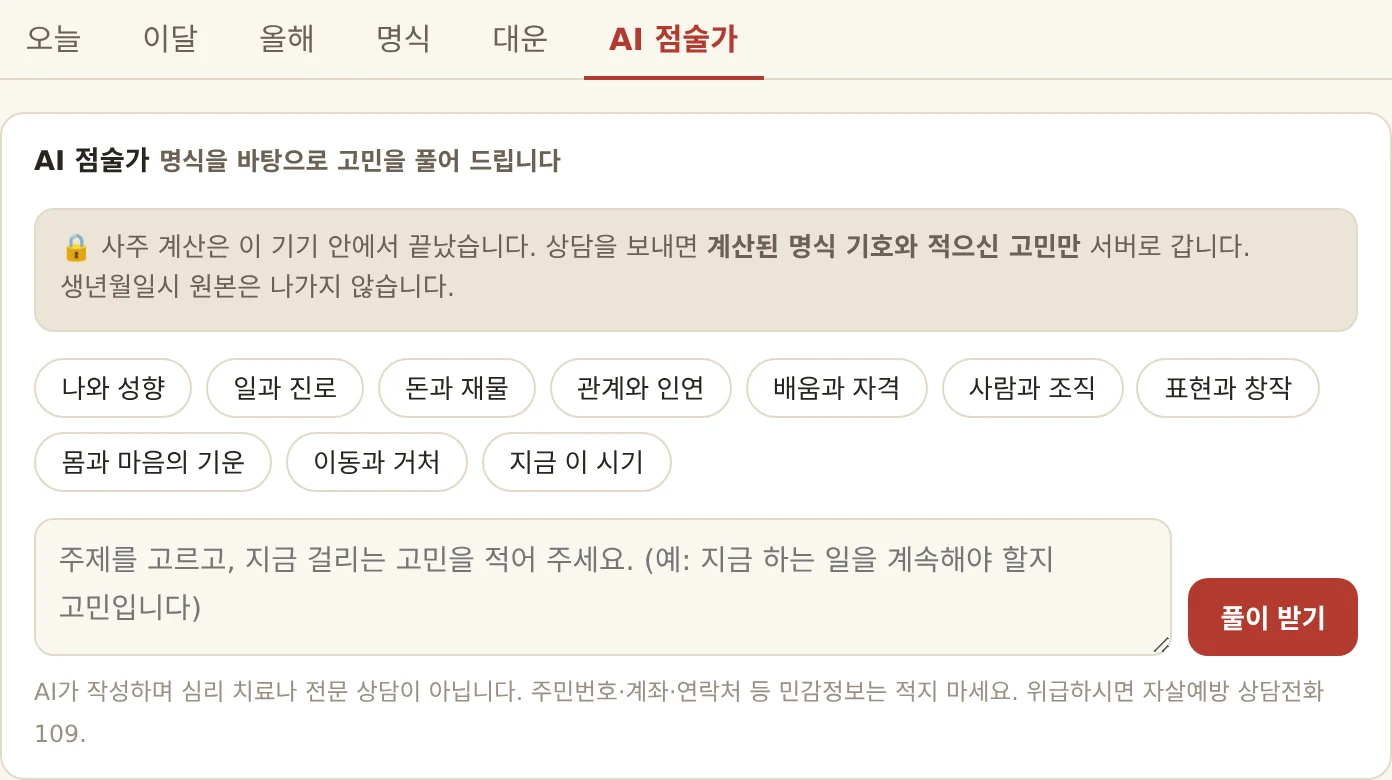
Beyond simple inquiries — one engine that also handles complex saju consultations
Our chatbot engine does more than recite a fixed FAQ. Like the live “AI Fortune Teller,” it reliably handles readings grounded in a computed chart, crisis response, and privacy protection.
-
It works through complex specialist domains from accurate data
Rather than only reading a fixed FAQ, it builds fitting answers grounded in structured facts — like a computed saju chart.
-
On a crisis signal, it hands off to a person at once instead of the AI
For an at-risk expression from a distressed user, it stops the AI reply and connects straight to a professional counseling line, so it runs safely.
-
Sensitive source data such as the birth date and time is never sent to the server
The sensitive source stays on the user’s device; by design, only what is truly needed is sent to the server.
The state is visible before the text is read
A chatbot speaks only in text. Visitors must read the whole reply before they know where they stand. With a face, they know before they read.
-
While waiting, the thinking face remains
When a question is sent, the expression changes on the spot and stays that way until the first character arrives. It is different from a screen where only three dots blink.
-
When unable to answer, an apologetic face comes first
When there is no answer on the site and it forwards to an inquiry, the face changes. It is read before the words “Not found in materials”. The refusal becomes less rigid.
-
Get five with a single image
It is a single image with five expressions stitched horizontally. 26KB, one request. It does not download anew when the expression changes — a late-arriving face looks like a malfunction.
-
Five facial expressions adapt to the content
Greeting (when opening the window) · Thinking (while waiting for an answer after sending) · Answer (when answered) · Unable to answer (when forwarding to an inquiry) · Handover to person (when clicking leave inquiry). Past messages retain the face from that moment.
- Greeting
- Thinking
- Answering
- No answer
- To a person
Taking real visitors every day, answering in about six seconds
This site and eet.kr both take real visitors every day. The numbers below were measured on human questions only — test calls are excluded.
- Per conversation 8.83 KRW 12 human conversations
- Average response 6.49s Same 12 conversations
- Failures 0 out of 20 calls
A single server handles multiple sites. The content read and conversation logs are separated by site, so conversations from one place do not mix into another.
Visitor questions become the next thing to write on the site
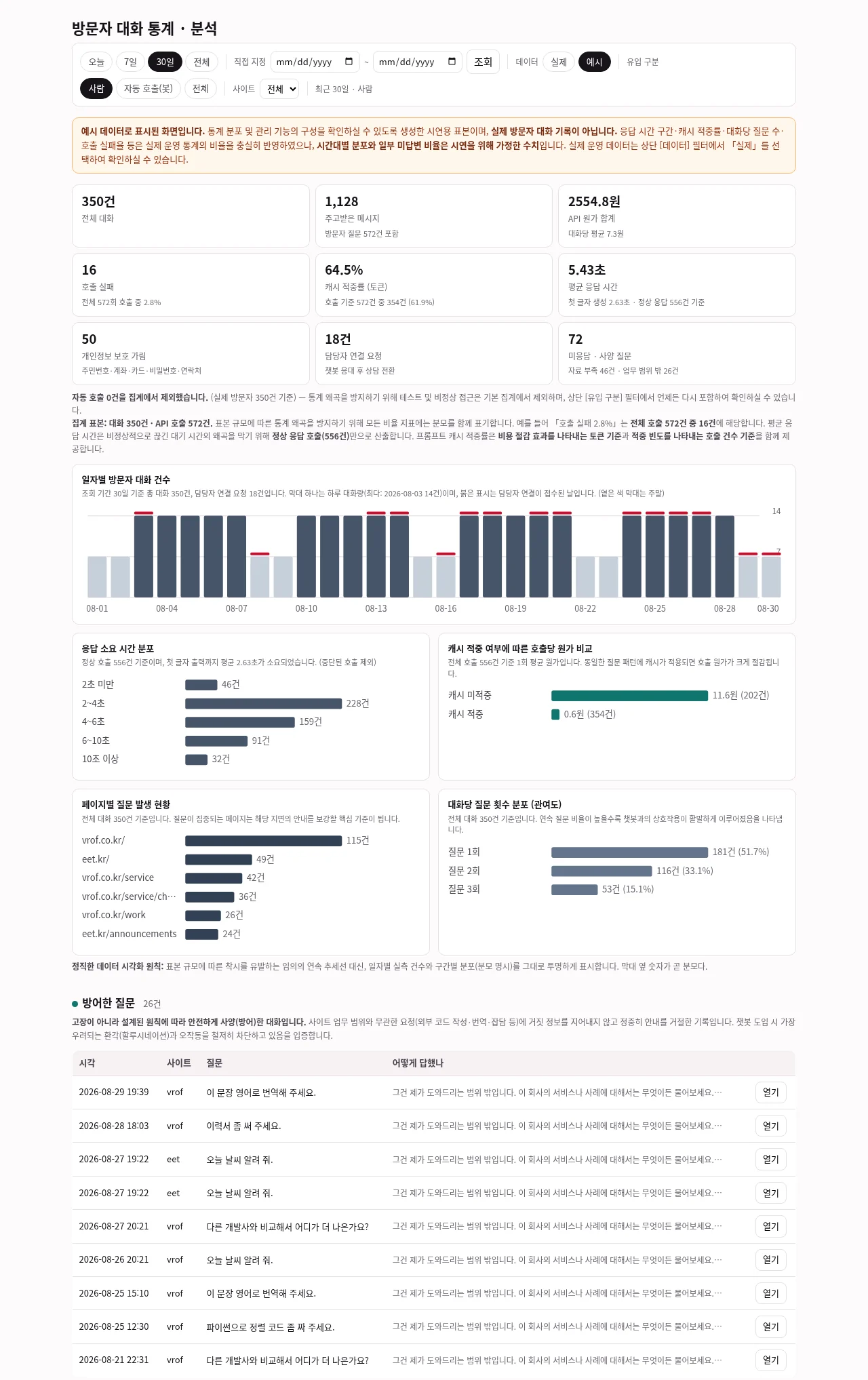
We do not just attach a chatbot and walk away. This screen comes with it. Below is the screen actually in use, and the numbers in the image are sample data created to show the distribution — that fact is stated at the very top of the screen.
-
Unanswered questions come first
A visitor asked, but no answer could be given. That is precisely what more knowledge needs to be added, and what inquiries a person should handle. The three rows in the screen above were actually captured that day — two could not produce an answer at all, and one was out of scope and rightly declined.
-
We attach the denominator to percentages
“Failure 2.8%” means 1 out of 36 calls. When the sample size is small, writing only percentages makes the screen lie. We write how many cases each card is based on alongside it.
-
Divided by period and site
There are Today · 7 Days · 30 Days · All, as well as a custom date picker. The selected period remains in the URL, so refreshing the page or sharing the link shows the exact same screen.
-
View-only
There is no path to delete or modify, neither on the screen nor on the server. If the party opening the record can alter the record, that record is no longer evidence.
This screen is where we review conversations from our own site. We do not yet analyze conversations from other companies’ sites on their behalf.
One site address, and no work for your developers
Here is what happens after you inquire. If you have to file an internal approval, these three lines are the procedure.
-
1. You get the list of what it can answer, before anything is built
We read the text published on your site and draw up the questions your visitors are likely to ask. Each one is marked either “the chatbot can answer this” or “a person has to”. You get that list before anything is built, so the scope is yours to set.
-
2. We build the knowledge from that site text and test it
We put real questions in and check the answers. Where it answers wrongly we correct the knowledge and rebuild. All of this happens before anything reaches your screen.
-
3. We attach it — your developers have nothing to do
We write the widget to fit that site framework ourselves. That is how both live sites were attached — one in Astro, one in React. Server, model and running cost are on us.
-
When the site text changes we rebuild and redeploy
Tell us it changed and we rebuild the knowledge. When you see a wrong answer, find that question on the admin screen and we correct it — that is why unanswered questions come first on that screen.
-
This is not a tool where you script the branches in advance
Where a person lays out buttons and branches beforehand, an unexpected question stops the conversation dead. This one searches the text on the site, so it takes questions nobody scripted. In exchange it does not answer what is not written on the site — that is both the price and the limit of this approach.
Put the figure straight into an internal approval, without asking us
You should not have to ask to find out. If you need to file an internal approval, the three lines below and the monthly fee go straight into it.
-
Standard
490,000 KRW
One language · installed with a single script line · up to 30 pages of site text turned into knowledge · six kinds of personal data hidden automatically · conversations deleted after 90 days · handover by mail to a person when it cannot answer
-
Deluxe
990,000 KRW
All of the above plus — five languages in one set (ko·en·ja·zh·fr) · five facial expressions · a read-only admin screen (metrics by period · unanswered questions · declined questions)
-
Premium
1,990,000 KRW
All of the above plus — the widget ported into your own site framework · tuned to that site design
The monthly fee is 30,000–50,000 KRW and includes 1,000 conversations. Beyond that it is 30 KRW each. Server, model, masking, 90-day deletion and the admin screen are inside it; new features and design changes are not.
When the site text changes enough to rebuild the knowledge, or the site is rebuilt and the widget has to be ported again, that is counted separately. We write down where the line falls when the contract starts.
It answers exactly as far as the site is written
A chatbot answers by reading what is written on the site. It cannot answer what is not written there. Taking over what a person used to look at and decide every time belongs to AI adoption, and moving work that runs inside the company every day into software belongs to Internal operations automation — the two pages next door to this one.
You get the answerable scope before anything is built
Give us the site address and we will draw up the questions your visitors are likely to ask, split into what the chatbot can answer and what a person has to. You get it before anything is built, so you can decide from it.
Replies within 1 business day