Custom consultation web app for aesthetic clinics connecting trust from the first tablet handover to decisions made at home
A tailored consultation system that fosters seamless trust from the moment clients receive a tablet upon entering the consultation room through to their decisions at home. Recommended treatments and before-and-after comparisons derived from a two-question selection are delivered to client smartphones via QR, with procedures and pricing updated directly within the clinic with zero recurring monthly fees.
Consultation intake and multilingual (4 languages) tailored treatment proposals and procedure menu verification
Before
Clients grew fatigued filling out lengthy paper intake forms, handwritten explanations given while flipping through price binders were forgotten once stepping out the door, and printed materials had to be discarded whenever treatment pricing changed.
After
Consultations are conducted collaboratively on-screen using a two-question selection and before-and-after sliders to foster clear understanding, completed proposals are saved directly to client smartphones via QR, and treatment updates are instantly reflected on the tablet through the admin screen.
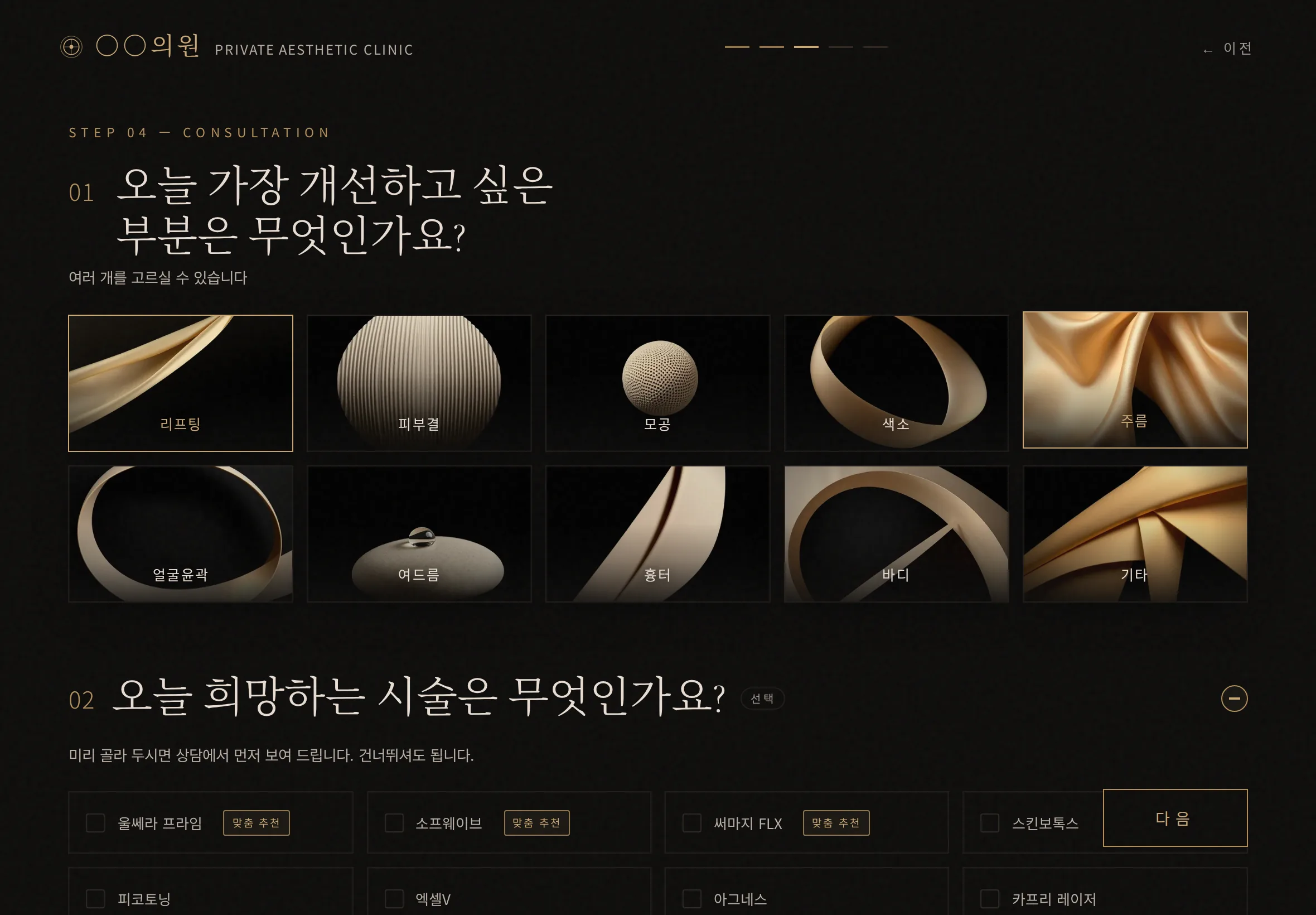
From the moment the tablet is handed over, two taps identify the client’s primary concerns and tailored treatments immediately
When clients enter the consultation room and take a seat, asking them to fill out densely packed paper intake forms creates fatigue before the consultation even begins. Introducing this system allows you to leave a refined first impression simply by handing them a clean tablet screen. The initial intake is completed with just a gentle tap on the two concerns they would most like to improve.
Based on the primary concerns and interests selected by the client, a ‘Recommended’ badge lights up in real time beside the most suitable procedure from the clinic’s treatment menu. Without going through lengthy questionnaires, both consultant and client can immediately grasp on screen what changes the client seeks today, eliminating unnecessary questions and creating a focused consultation environment that moves straight to the core discussion.
Instead of flipping through price binders, reviewing before-and-after comparisons and detailed specifications together on screen
Consultations where a manager flips through thick price binders or punches numbers into a calculator to unilaterally read out estimates can easily place psychological pressure on clients. Introducing this system establishes a collaborative environment where consultant and client sit side by side, engaging through visual communication on screen.
Tapping a recommended procedure opens an interactive before-and-after comparison slider in the center of the screen. Clients can slide it left and right themselves to visually see the anticipated changes following the procedure. Alongside this, four key specifications—procedure duration, recovery downtime including bruising and swelling, pain level, and recommended treatment interval—are clearly quantified and presented. Without requiring lengthy explanations from the consultant, a calm consultation flow is established where clients understand the necessity and process of the procedure on their own and arrive at confident decisions.
When international clients visit, no rushing for an interpreter—responding immediately in four languages refined by the clinic
When international patients or tourists visit the clinic, the front desk no longer needs to scramble calling an interpreter or relying on external translation apps. With a single tap at the top of the tablet, the entire screen switches instantly between four languages: Korean, English, Japanese, and Chinese.
The multilingual content provided here is not automated machine translation prone to mistranslations. Instead, procedure names, detailed descriptions, and precautions are directly registered and managed in four languages through the admin screen according to your clinic’s standards. From intake questions and recommended item names to before-and-after descriptions, the four key specifications, and the final proposal, all content is displayed using precise medical and aesthetic terminology without translation errors. Even when international clients arrive, you can conduct refined consultations without language barriers smoothly from a single tablet without hesitation.
Instead of forgotten handwritten estimates, delivering proposals directly to client smartphones for consideration at home
Paper estimates written by hand after a consultation are often crumpled into bags or forgotten the moment clients walk out the clinic doors. In this system, the finalized procedures and pricing from the consultation screen convert into a clear QR code with a single tap.
When clients point their smartphone camera at the QR code, a mobile web page opens immediately in their browser showing the exact document number, selected procedures, and itemized pricing displayed on the tablet. On their way home or at their leisure, clients can calmly review which procedures were proposed and their associated costs. Because they can look at the screen together with family or acquaintances to discuss treatment options thoughtfully, the professional trust built inside the clinic carries seamlessly into the client’s hands even after leaving the clinic.
Instead of reprinting materials, updates made in the admin screen reflect immediately on that tablet
The hassle of reprinting and replacing brochures or paper forms whenever treatment offerings or non-reimbursable pricing change is eliminated. Updating item names or prices in the tablet’s admin screen instantly updates the intake screen on that device, ensuring patients are always provided with accurate clinic information. Because it is structured to operate independently within the device without routing through external servers or complex IT networks, there are no recurring monthly server maintenance fees or cloud subscription costs. If you deploy and operate multiple intake tablets within the clinic, initial setup and device-by-device operational procedures can be coordinated and guided in detail upon delivery to suit the director’s clinical workflow and front desk convenience. Whenever seasonal programs or price adjustments occur, the front desk can update the screen immediately as needed and apply it directly to consultations, without incurring printing costs or waiting for an external vendor to make modifications.
Personal information remains masked rather than exposed, and is automatically deleted from the device after 24 hours
Patient names and contact details are displayed in a masked format on both the intake screen and admin list, preventing patient personal data from being easily exposed to onlookers around the waiting area or front desk. When original details need to be verified, they are accessed through a separate verification step within the admin detail view, with every access event fully logged directly on the device. Furthermore, when downloading intake files from the device for clinical records or administrative organization, only the masked information matching the screen is included, reducing the risk of personal data exposure during internal record management. Patient intake records are processed solely on the device for same-day intake without being transmitted to external internet servers, and are automatically wiped from the device after 24 hours so that unneeded records do not accumulate within the clinic. Designed to manage only the minimal information essential for same-day intake under strict access procedures, this substantially relieves the front desk’s data handling burden.
Instead of relying on uncertain specifications or mockups, you can directly verify the live working screen running in your browser right now
It is not uncommon to sign contracts relying merely on static mockups or proposal descriptions, only to experience setbacks during development when features malfunction or the actual handling feel on site falls short. This system transparently opens up a live working screen externally, where all core capabilities—instant four-language switching, two-question tailored treatment derivation, before-and-after sliders, smartphone QR proposal generation, and real-time admin updates—are actively running.
You do not have to shoulder ordering risks based on unsubstantiated assumptions. Operate the publicly accessible screen yourself in a PC or tablet browser, and verify with your own eyes the touch response speed and the maturity of the consultation flow. Carefully assess, from a realistic perspective, the distinct professionalism that will be conveyed to visitors when placed on your clinic’s consultation desk, and make an adoption decision with confidence.
If you send photos of the paper intake sheets or price lists currently used in your clinic, we will configure and share a custom trial link loaded with your clinic’s actual treatment menu and consultation flow first. Try it out directly to see how it operates on a tablet and what differentiated consultation experience it can deliver to your clinic’s clients before deciding whether to proceed with adoption.
Sources
Demonstration screens and repository history · Full live inspection records from September 4–5, 2026