Cut tax invoice issuance from a full day for one person to one hour
Every morning, it reads the settlement ledgers that 26 vendors send by email on its own and builds the register of who should be invoiced and for how much. Opening each email, downloading attachments, and transcribing amounts by hand are gone — the only human step left is pressing the issue button.
From checking settlement ledgers to the tax invoice issuance register
Before
One person all day
After
1 hour
Background
The same work repeated itself at the start of every month.
Open the mailbox, find the settlement ledgers each vendor sent, download the attachments, open the Excel files, transcribe the amounts one by one, and then issue dozens of tax invoices from what was compiled. It was work that kept one person busy for an entire day.
Besides, those settlement ledgers do not gather in one place. 26 places each make their own format and send the Excel file attached. The formats fall into about four families, and both the name each item is called by and where it sits differ between them. In some families, the word 「공급가액(supply value)」 itself does not exist.
And the amounts drawn from here become tax invoices exactly as they are.
The problem we defined
A program can be operating normally, and the result can still be wrong.
- A wrong number shows up just as cleanly. Even if the Excel files from 26 places are gathered on one screen, no one tells you whether the values in them are right
- No error occurs. So it is found even later. An amount shifted by one cell does not turn red on the screen. You have to open each Excel file and compare them to see it
- And that amount becomes a tax invoice exactly as it is. If it goes out wrong, a penalty tax(가산세) is added, and correcting it means issuing a revised invoice(수정발급) again
We find places like this and turn the work that a person repeatedly checked every month into a system. So we set the goal not as 「collecting」 but as 「checking whether it is right, too」.
What we built
- You choose what happens to the processed mail — mark it as read, move it to a folder you designate, or leave it untouched. The default is 「leave it untouched」. It stays unread even after you read the whole body, and it is neither deleted nor moved. The idea is to let the person in charge start while using their own mailbox as usual, and if you want to change it later, you can change it then
- However many formats there are, the system tells them apart on its own — the formats of 26 vendors fall into four families. If it only recognized one family, the rest of the vendors would quietly become 0건
- The amounts drawn out are reconciled once more, by a different program — we built the side that reads the amounts and the side that checks whether those values are right separately. The checking side actually opens the Excel file and brings in the values the person in charge sees on the screen to compare them. We chose the side that adds one more layer
- It is done by 07:30 every morning — settlement ledgers do not all arrive at once on the 10th of the month; they come scattered from the 1st through the 9th. So it runs every day. If something stopped during the night, it shows up in the one email sent at 8 a.m.
- 16 automatic tests rerun on every change — fixing one thing never silently breaks another
Where the screen looks fine but only the amounts are wrong
This happens just as it is at any company that receives settlement ledgers from vendors.
- One decimal point throws off the supply value, VAT, and the total. Some vendors send amounts written in decimals, and on those ledgers the supply value plus VAT does not match the total. When we first swept the whole volume, 76 out of 427 cases were like that. We re-reconcile each case every time a settlement ledger comes in. So at your company, a tax invoice with wrong amounts cannot reach the issuance stage.
- An Excel file a vendor sent looks blank to the program. Files that show amounts sitting properly when opened in Excel but that the program cannot read really do arrive. Then that vendor alone quietly becomes 0건. And to the human eye it is a completely normal file, so even the person in charge who opened the file to check finds nothing odd. For files that failed to read, we have a spreadsheet program calculate them directly and read them again. So at your company, it never gets passed over as 「that vendor probably just didn’t send anything this month」.
- There is a path that ends up issuing the same case twice. When a vendor sends the settlement ledger again, the 「발행완료(issuance complete)」 mark the person in charge had pressed is cleared. No error or warning remains. For cases the person in charge changed to 「발행완료」, we keep the status as it is and update only the amounts. So automatic collection cannot overwrite a decision your person in charge made.
What we caught
It was not calculation alone that made issuance wrong. Everything below is a place that issues something that must not be issued, or misses something that must be issued.
- A settlement ledger with a negative amount arrives. It means the vendor will offset it next month, so if it is read as a positive number, an invoice that did not need to be issued goes out. Right now we set it apart separately as 「발행불요(issuance not required)」
- 「발행 안 해주셔도 됩니다(you don’t have to issue it)」 arrives written only in the email body, not in the Excel file. A system that looks only at attachments misses this. So we read the sentences in the body too
- A file one vendor sent had another company’s name written inside it. Had that notation been trusted, someone else’s amounts would have been added to your company’s amounts. We identify the company by the file name alone
- Some vendors send to a folder other than the inbox, and some settlement ledgers get pushed into spam. If you look only at the inbox, that vendor looks like 「두 달째 소식 없음(no news for two months)」. But having the system read the whole spam folder would bring attachments from unknown senders into the register. Right now we look only at vendor addresses registered in advance. An attachment sent from an unregistered address has no path into your issuance register
The result
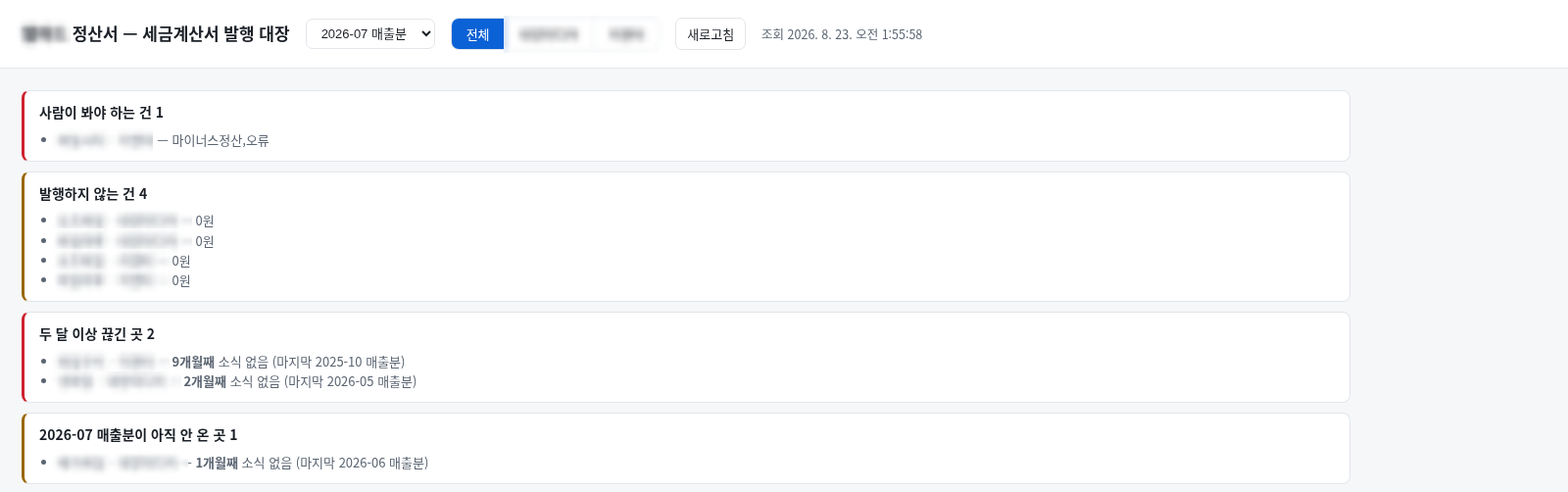
When an email arrives, the issuance register fills itself, and whether the values in it are right is checked every time. When the 46건 of the July 2026 batch were opened directly in a spreadsheet program and compared, mismatches were 0건.
The work that kept one person busy for an entire day now ends in 1 hour. Opening the emails, telling apart the four format families of 26 places, pulling out the amounts, re-reconciling, cross-checking with a separate program, and filling the register with 「누구에게 얼마를 언제까지(to whom, for how much, by when)」 to issue — all of it is done by 07:30 every morning. What the person in charge does is one issue button.
The system also picks out what needs to be looked at. Cases mixed with negative settlements or errors are set aside separately, and vendors silent for more than two months are pointed out as well. You don’t have to check 「이번 달은 다 왔나(did everything come this month?)」 from memory every month.
So for your company
If your company receives settlement ledgers, statements, and bills by email and makes tax invoices or bills from those numbers, it applies to you as is. We build the same structure whether your vendors are 26 or three. Vendors each having a different format, amounts arriving in decimals, some places sending their conditions only in the email body — all of these are places we have already been through once and solved. What is left for the person in charge is checking and pressing the issue button.
Other work on the same subject is gathered under data analysis.
The other systems we use to run our own company are gathered under in-house operations automation.
Sources
A written statement from the representative and execution logs of the system running in-house